 Other Related Topics...
Creating Templates
You can create a GoldMine template, insert information into it from a GoldMine contact database, and send the merged documents as faxes.
To create a template, follow the steps below. For more information about creating templates, see the appropriate section in the GoldMine manual.
| 1. | Create a new Microsoft Word document and include all the text and graphics that will stay the same for each version of the merged document. |
| 2. | Place your cursor at the desired location and then, from the MS-Word Insert menu, select GoldMine Field... The Insert GoldMine DDE Field dialog will appear. |
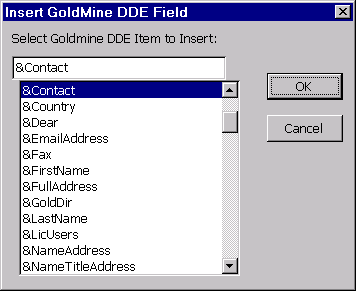
| 3. | Select the desired field names from the list and then press the OK button. The selected fields will be placed into the template document. |
| 4. | Repeat insertions as needed to add additional Goldmine fields. |
| 5. | Save the template by selecting File / SaveAs GoldMine Template.... |
If the document has not been previously saved, you will be prompted for a document title file name to save it. This will make an entry in the GoldMine Merge Forms window.
| 6. | The template document you just created will now be available from your list of merge forms. |
To verify that this operation was successful, select Merge Forms... from your GoldMine File menu to bring up the Merge Forms dialog:
The forms will be listed number the name of the current Goldmine user displayed in the Forms of User scroll down list.
| 7. | Selecting the document and clicking the Properties button will bring up the properties of the document: |
■ Form Name field should contain the title of the document
■ Template Filename field should contain the full path to the Word document
■ App Identifier field should contain “Word.Document.8”
■ DDE Command field should contain “[GoldMineLink()].” If these settings are not correct, a GoldMine merge using this template will not work.
|
FaxPress WebHelp
Last Updated: 9/12/2007
E-mail this page |
Castelle 855 Jarvis Drive, Suite 100 Morgan Hill, CA 95037 Toll-free 800.289.7555 Tel 408.852.8000 Fax 408.852.8100 |